


ModMatrix - Mods for Minecraft
4.227.00 Reviews
App Specs
- Version
- 14.0.16
- Updated On
- License
- Free
- Downloads
- 1,000,000+
- Developer
- KeytoKey
- Categories
- Books & Reference
- Platform
- Android
Screenshots



 Analysis by AppCompare
In a shared home, a Minecraft mod app can quickly become a group decision: one person wants a new challenge, someone else is curious about different creatures, and the device may not belong to just one player. I’d treat ModMatrix as a place to browse ideas together, then make each installation a deliberate choice. That small pause matters: a mod changes the game experience, so it helps to agree on what to try before anyone starts tapping through setup.
Choosing mods together without creating a muddle
The app’s appeal is its range of themes, including guns, trains, magic, pets, and one-block play. Those options make it easier to start with a shared question—“What kind of world do we want today?”—rather than scrolling without a plan. For a short session, a one-block concept may be easier to understand than a collection of unfamiliar changes; for a longer creative session, a themed addition can give players a common project to explore.
On a family tablet or a device passed between siblings, I’d keep a simple verbal agreement: who is choosing, which mod is being tried, and whether the current world should be left untouched. That is not a feature of the app; it is just a sensible way to avoid confusing one player’s experiment with another’s saved play. If the device is used by several people, checking the active game profile before following an installation guide can save a lot of frustration.
Set expectations before following setup steps
ModMatrix is free to download, while some in-app items are listed at prices ranging from $22.99 to $47.99 per item. I would make that distinction clear before handing the phone to a younger player: browsing the app and choosing whether to spend are separate decisions. If you do not want an accidental purchase, use the purchase protections already available through the device’s account settings rather than relying on a child to infer what a button means.
Installation instructions deserve the same careful reading as the mod description. A useful habit is to read the full sequence first, check that the selected item fits the Minecraft edition and device you actually use, and only then begin. I would avoid starting an install when there is little time left before school, bedtime, or a shared gaming session; if something needs another step, there is less room to sort it out calmly. Treat any instruction that asks you to leave the app or change a device setting as a reason to pause and understand what is being requested.
The app runs on Android, and its listed minimum operating-system requirement is version 8.0. That makes device compatibility a practical first check, especially on an older household phone. The app itself is rated Everyone, but that label does not automatically make every mod suitable for every player or every family. I would review the theme and instructions alongside the age and preferences of the person who will use it, particularly when choosing content involving weapons or more intense gameplay.
Coordination matters more than collecting everything
A shared device makes the biggest trade-off clear: more choice is useful only when people can keep track of what they have chosen. I’d try one mod at a time, note its name before leaving the app, and give the player who requested it the chance to see whether it works as expected. This makes it easier to identify which change caused a problem if the game behaves differently, and it avoids turning a fun experiment into a confusing pile of simultaneous changes.
Worth Reading Before You Choose

Flipboard Shows What News Apps Must Do Beyond the Feed

Switching to Android Auto Means Rethinking Your Driving Routine

Google Calendar Makes a Crowded Week Easier to Manage

Ludo King Makes the Most of the Minutes Between Plans

Baby Panda World Brings Quick Play to Modern Phones, but Its Game Library Feels Busy

ESPN’s Live Game View Makes Following Close Games Easier
That one-at-a-time approach is also a good way to judge fit. A mod can sound appealing in a short description but still be wrong for a particular world, player, or device. If a child wants to try several themes, take turns choosing rather than installing a stack all at once. If adults and children share the game, agree whether the goal is a calm creative session, a more challenging adventure, or simply a quick novelty; those goals can point to very different choices.
Compared with searching the web for individual downloads, a dedicated mod-browsing app can make discovery feel more organized because the options are gathered in one place. The trade-off is that a convenient catalog does not remove the need to check compatibility or understand an installation step. Players who want full control over every file may prefer their usual manual method, while someone new to add-ons may appreciate having categories and instructions together. I see the app as a discovery aid, not a reason to skip basic caution.
Who is likely to enjoy it—and who may not
For a player who regularly returns to Minecraft and wants a fresh idea without first planning a complex custom setup, this app is an approachable starting point. It is especially useful when a household wants to browse a few distinct directions—such as pets, trains, or magic—and choose one that suits the next session. Someone who only wants the standard, unchanged Minecraft experience may have little reason to install a separate mod catalog, and a player who dislikes following setup instructions may find the extra steps less appealing than simply playing the base game.
It is also worth distinguishing discovery from a guarantee that every choice will behave the same way. Minecraft versions, device capabilities, and the kind of content selected can affect how useful an add-on is in practice. Before committing a shared world to a change, I’d consider trying it in a separate or less important world if that option is available in the Minecraft setup you use. That is a cautious workflow, not a special ModMatrix function, and it gives everyone a clearer way to decide whether the change is worth keeping.
For an everyday example, imagine two siblings sharing a tablet after homework. One wants to try a pet-themed addition, while the other would rather explore a one-block challenge. They can browse together, agree on one choice for that session, and let the person who picked it follow the instructions while the other checks that the correct game profile is open. If setup takes longer than expected, they can stop and return to it later instead of rushing through prompts. The useful result is not just a new mod; it is a more predictable handoff of a shared device.
Hey there, fellow Minecraft enthusiast! If you're like me, always on the lookout for ways to spice up your blocky adventures, then ModMatrix - Mods for Minecraft might just be the app you need. I’ve been tinkering with it for a while now, and let me spill the beans on everything it has to offer.
What’s the Deal with ModMatrix?
So, what exactly is ModMatrix - Mods for Minecraft? In a nutshell, it's this super handy app that lets you explore a world of mods to enhance your Minecraft experience. Whether you’re playing on Android or iOS, this app has got your back. It brings a whole new dimension to gameplay by offering mods that range from simple texture changes to full-blown gameplay overhauls.
Easy Navigation and Setup
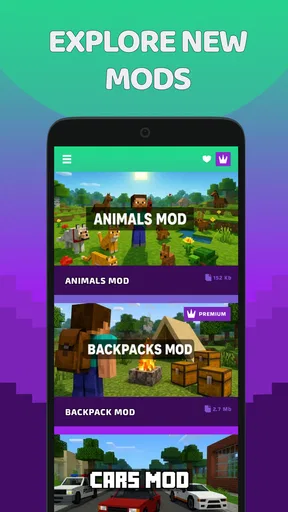
First things first, the user interface. It’s clean, intuitive, and won’t leave you scratching your head. Once you dive into the app, you’re greeted with a neat layout where everything is just a tap away. Navigating through the different mod categories is a breeze, and trust me, there are loads to explore!
Setting up the mods is straightforward. Each mod comes with clear instructions, making it easy even for those who aren't tech-savvy. Just follow the steps, and you’ll have your game modded in no time. The app ensures that the installation process is seamless, so you can spend more time playing and less time troubleshooting.
A Wide Array of Mods
Now, onto the juicy part— the mods themselves! The variety here is staggering. Whether you’re into adding new creatures, enhancing visuals, or tweaking gameplay mechanics, ModMatrix has something for everyone. It’s like stepping into a candy store for Minecraft fans.
- Visual Mods: These are perfect for those who want to give their game a facelift. From shaders that make the water shimmer to texture packs that add a realistic touch, your game will look better than ever.
- Gameplay Mods: Want to add new dimensions or craft epic weapons? There are mods for that too. They add layers of complexity and fun to your adventures.
- Mob Mods: Fancy some new company? Add some mythical creatures or new mobs to interact with. These mods keep the excitement alive!
Community and Support
One of the coolest aspects of ModMatrix is the community vibe. The app encourages users to rate and review mods, so you get a feel for what’s hot and what’s not. Plus, there’s a dedicated support team ready to help if you run into any issues. It’s like having a safety net while you’re exploring new modding horizons.
Final Thoughts
All in all, ModMatrix - Mods for Minecraft is a fantastic tool for any Minecraft player looking to shake things up. With its user-friendly design, vast mod library, and strong community support, it’s a must-have for both new and seasoned players. So, go ahead and give it a whirl. Your Minecraft world is waiting to be transformed!
Ready to dive in? Head over to the download link and start exploring the endless possibilities that await. Happy modding!
Making sense of ratings, updates, and value
KeytoKey publishes this free Books & Reference app, which has a 4.2 average from around 2.5 thousand ratings and more than 500 thousand installs. Those figures suggest that plenty of players have found it worth exploring, but I would still judge individual mods on their own merits. A broad audience does not mean every add-on will suit a particular household, and ratings are most helpful when read as a general signal rather than a promise that a specific download will work perfectly for every setup.
The current version is 14.0.0. When returning to the app after a while, I’d take a moment to see whether its interface or the instructions for a chosen mod have changed before repeating steps from memory. That is particularly useful on a shared device: one player may remember an earlier process, while another is looking at a newer version. The app is for Everyone, but household expectations still matter; parents and caregivers should decide together what themes feel appropriate rather than treating an age label as a substitute for that judgment.
One practical way to get more value from the catalog is to browse by the kind of session you want, not just by the most eye-catching theme. A quick family play might call for an addition that is easy to explain, while a player with more time could be happier exploring a substantial change. Before choosing, I’d ask three questions: does this fit the player’s interests, does the device meet the app’s requirements, and is there enough time to follow the instructions carefully? That quick check can prevent a rushed install from interrupting the session.
Where it fits among Minecraft add-on options
Compared with staying in the regular game without add-ons, ModMatrix is for people who enjoy changing what a Minecraft session feels like. Compared with tracking down separate files and instructions elsewhere, its main practical advantage is having ideas gathered in a focused browsing experience. Neither route is automatically better: players who want simplicity may prefer the unmodified game, while confident users who want to manage every step themselves may favor a manual approach. I’d choose based on how much discovery and guidance I want, not on the assumption that a catalog removes every compatibility question.
It is also not the right fit for every kind of Minecraft player. If your priority is a predictable world that everyone can join without discussing changes, leaving the game untouched may be easier. If you are helping a younger player, browsing together is more useful than handing over the device and assuming every choice is suitable. And if you need a specific add-on for a particular edition or setup, check the details before getting attached to it; finding an interesting idea is only the first part of making it work in your own game.
A sensible household routine
For shared use, I’d keep the decision-making lightweight: one person picks the theme, another reads the setup directions aloud, and everyone agrees which world or session is involved. If the result is not what the group wanted, pause rather than layering on another change to compensate. This simple routine helps distinguish a mod that is not a good match from a setup issue, and it gives less experienced players a chance to understand what is happening instead of treating installation as a string of unexplained taps.
For account boundaries, the important distinction is between the app being free to install and paid items being available inside it. On a device used by children, I’d review the purchase controls attached to the household’s account before browsing and make the spending rule clear in plain language. That approach is more reliable than expecting every player to recognize which actions involve payment, and it does not depend on ModMatrix providing family-management tools.
My overall view is that this is a useful discovery stop for Minecraft players who want themed changes and are willing to make a little room for setup. The catalog’s range can help a household find a shared activity, but compatibility checks, age-appropriate choices, and clear purchase boundaries remain part of using it thoughtfully. If your group enjoys experimenting, browse together and start with one carefully chosen mod; if you value an unchanged, low-maintenance game above all, you can comfortably skip the extra layer.
Pros
- Extensive mod library with frequent updates.
- User-friendly interface for easy navigation.
- Fast download speeds for mods and packs.
- Detailed mod descriptions and previews.
- Seamless integration with Minecraft versions.
Cons
- Requires stable internet for initial setup.
- Occasional bugs with less popular mods.
- Subscription needed for premium features.
- Limited customer support response time.
- Some mods may cause game performance issues.
FAQs for ModMatrix - Mods for Minecraft
What is ModMatrix - Mods for Minecraft?
ModMatrix is a comprehensive application designed to enhance your Minecraft gameplay by providing a wide selection of mods. These modifications can range from cosmetic changes to gameplay enhancements, giving you the ability to customize and expand your Minecraft experience uniquely. The app is user-friendly and caters to both beginners and advanced players.
Is ModMatrix compatible with all versions of Minecraft?
ModMatrix strives to support a wide array of Minecraft versions, ensuring that most users can benefit from its features. However, compatibility can vary depending on the specific mod and the version of Minecraft you are using. It’s advisable to check the details of each mod within the app for version compatibility before installation.
Are the mods in ModMatrix safe to use?
The team behind ModMatrix takes security seriously, regularly screening mods to ensure they are safe and free from malware. Nevertheless, users should always exercise caution and read user reviews and ratings within the app to ensure a smooth and secure experience. Backing up your game data is also recommended before installing new mods.
How can I install mods using ModMatrix?
Installing mods via ModMatrix is straightforward. Once you’ve selected a mod, the app provides step-by-step instructions to guide you through the installation process. This includes downloading the mod and integrating it with your Minecraft game. The app’s intuitive interface simplifies the process, making it accessible even for those new to modding.
Does ModMatrix require a subscription or payment?
ModMatrix offers a free version that provides access to a broad selection of mods. However, there might also be a premium version or in-app purchases that offer additional features, such as exclusive mods or an ad-free experience. Check the app’s pricing details on the download page to understand any costs involved.


